终于搞出来一个了,不容易。
源代码及下载:http://sites.google.com/site/xhackerbase/Home/suduku
此版本可以生成数独,命令行界面,无其他功能。如果要加上做数独的功能,有两大难点:
1.挖洞:如何挖出难度很大的数独题,又有唯一解?只有再写一个求解的函数;
2.控制:命令行的程序无法控制,一种方法是用GUI(GTKmm),其二是使用curses(这个能跨平台吗?Linux和Mac倒是都没问题),都有一定难度。
还请大家多多指教,发表意见,期待下一版本。
2008年8月15日星期五


2008年8月10日星期日
数独 Sudoku
最近突然对数独了感兴趣了。经过一番研究,现在,我基本上已经不怕任何难度的数独了。怎么办呢?我决定编一个生成数独的程序,经过一番思考,有以下两个想法:
1) 先随即生成一个3*3,然后再把其中的1*3向右下平移,3*1向下右平移。总之说白一点就是把3*3变换到9*9。这个非常简单,就是做出的数独太有规律了;
2) 按照[1][1], [1][2], ..., [1][9], [2][1], ..., [9][9]的顺序慢慢生成。(俺家CPU还行,呵呵)。
建立几个函数:
bool isUni_Row (int row);
bool isUni_Col (int col);
bool isUni_Nine (int row, int col);
bool isUni (int row, int col)
//用来检查生成数字在行、列、3*3中的唯一性
int randNum (int time); /*用来生成随机数,time是生成的次数,生成9次随机数不能重复(可以用time控制)*/
从第1个格一直到第99个格,每个格都
sudoku[row][col] = randNum (time);
time++;
if (!(isUni (row, col))) {/*重新算这个格,如果time==9,回到上一个格*/}
以上是大致的方法,当然估计计算量会惊人。
过几天写完以后,我会放出代码。因为最近在学C++,所以用C++写。
那位有更好的方法,或想助我一臂之力,请回复。
1) 先随即生成一个3*3,然后再把其中的1*3向右下平移,3*1向下右平移。总之说白一点就是把3*3变换到9*9。这个非常简单,就是做出的数独太有规律了;
2) 按照[1][1], [1][2], ..., [1][9], [2][1], ..., [9][9]的顺序慢慢生成。(俺家CPU还行,呵呵)。
建立几个函数:
bool isUni_Row (int row);
bool isUni_Col (int col);
bool isUni_Nine (int row, int col);
bool isUni (int row, int col)
//用来检查生成数字在行、列、3*3中的唯一性
int randNum (int time); /*用来生成随机数,time是生成的次数,生成9次随机数不能重复(可以用time控制)*/
从第1个格一直到第99个格,每个格都
sudoku[row][col] = randNum (time);
time++;
if (!(isUni (row, col))) {/*重新算这个格,如果time==9,回到上一个格*/}
以上是大致的方法,当然估计计算量会惊人。
过几天写完以后,我会放出代码。因为最近在学C++,所以用C++写。
那位有更好的方法,或想助我一臂之力,请回复。
2008年8月8日星期五
2008年8月8日的行程 + “绿色”奥运害死人
今天是8月8日,我和我爸觉得应该出去转转。下面就分享一下我们今天的行程吧。
第一站:丰台垒球场。
因为家住得较近,就先去看看。不多说了。
第二站:鸟巢以及水立方。
那人是相当的多啊!今天又是一个阴天,照片照出来也没什么意思。
第三站:中关村。
突然发现中关村挺近的,顺便去转转。
第四站:Apple Store。
本来想坐地铁回家,突然发现10号线途径Apple Store,我上次想去也没去成,正好去转转。
首先,我想说,应该是一个恶搞的哥们把我给害了。要知道boss耳机的最大音量可是很爽的。
试用以后还是觉得Mac没有Ubuntu好用。不过,我还是很喜欢苹果的键盘和鼠标,可惜不知道有没有Ubuntu的驱动。
30寸Apple Cinema HD Display太劲爆了,当然价格也很劲爆。看那里有一个13在问Mac能不能装Win,不说什么了。
第五站:KFC。
终于吃中午饭了。
现在再说说绿色奥运。今天股市一片大绿,原来这就是传说中的“维稳”,原来这就是传说中的“奥运行情”,原来这就是传说中的“绿色奥运”。啊,股民朋友们,向你们默哀……
第一站:丰台垒球场。
因为家住得较近,就先去看看。不多说了。
第二站:鸟巢以及水立方。
那人是相当的多啊!今天又是一个阴天,照片照出来也没什么意思。
第三站:中关村。
突然发现中关村挺近的,顺便去转转。
第四站:Apple Store。
本来想坐地铁回家,突然发现10号线途径Apple Store,我上次想去也没去成,正好去转转。
首先,我想说,应该是一个恶搞的哥们把我给害了。要知道boss耳机的最大音量可是很爽的。
试用以后还是觉得Mac没有Ubuntu好用。不过,我还是很喜欢苹果的键盘和鼠标,可惜不知道有没有Ubuntu的驱动。
30寸Apple Cinema HD Display太劲爆了,当然价格也很劲爆。看那里有一个13在问Mac能不能装Win,不说什么了。
第五站:KFC。
终于吃中午饭了。
现在再说说绿色奥运。今天股市一片大绿,原来这就是传说中的“维稳”,原来这就是传说中的“奥运行情”,原来这就是传说中的“绿色奥运”。啊,股民朋友们,向你们默哀……
2008年8月2日星期六
CN Wikipedia's entires reached 200,000!
Today, on Wikipedia, suddenly found that the Chinese Wikipedia entires breakthrough 200,000! Recall that when the entires reached 100,000 and 150,000, we have pleased. Today, the amount is 200,000! We have a more powerful Wikipedia!
As an important milestone, by November 12, 2006, the Chinese Wikipedia entries breakthrough 100,000.

October 21, 2007, the Chinese Wikipedia entries breakthrough 150,000.
Now, another good news: Wikipedia has been unblocked!!! Blogspot has been unblocked too!!! Great!!!


As an important milestone, by November 12, 2006, the Chinese Wikipedia entries breakthrough 100,000.

October 21, 2007, the Chinese Wikipedia entries breakthrough 150,000.

Now, another good news: Wikipedia has been unblocked!!! Blogspot has been unblocked too!!! Great!!!

2008年7月31日星期四
QQ for Linux released

Just now, I went to LDCN (http://www.LinuxDesktop.cn). To my suprise, QQ for Linux released.
Usually, my faborite im is GTalk (I use Pidgin at Ubuntu), but sometimes, my friend give me a QQ number. I tried to run LumaQQ or EvaQQ (and also Pidgin), but they were not work well. So, I was not use QQ for about 1 year.
Now, the offical Tencent QQ for Linux released. I will try it.
It has DEB, RPM, and also tar.gz version, for all kinds of Linux.
When I enter my QQ number and password, it says I need to activate my passport (Maybe I was not use it for a long time). After activated, it worked well at my Ubuntu. My desktop environment is LXDE (Lightweight X11 Desktop Environment). By the way, this DE is really fast.
Oh, it crashed. So, yeah, it is Pre version.
2008年7月15日星期二
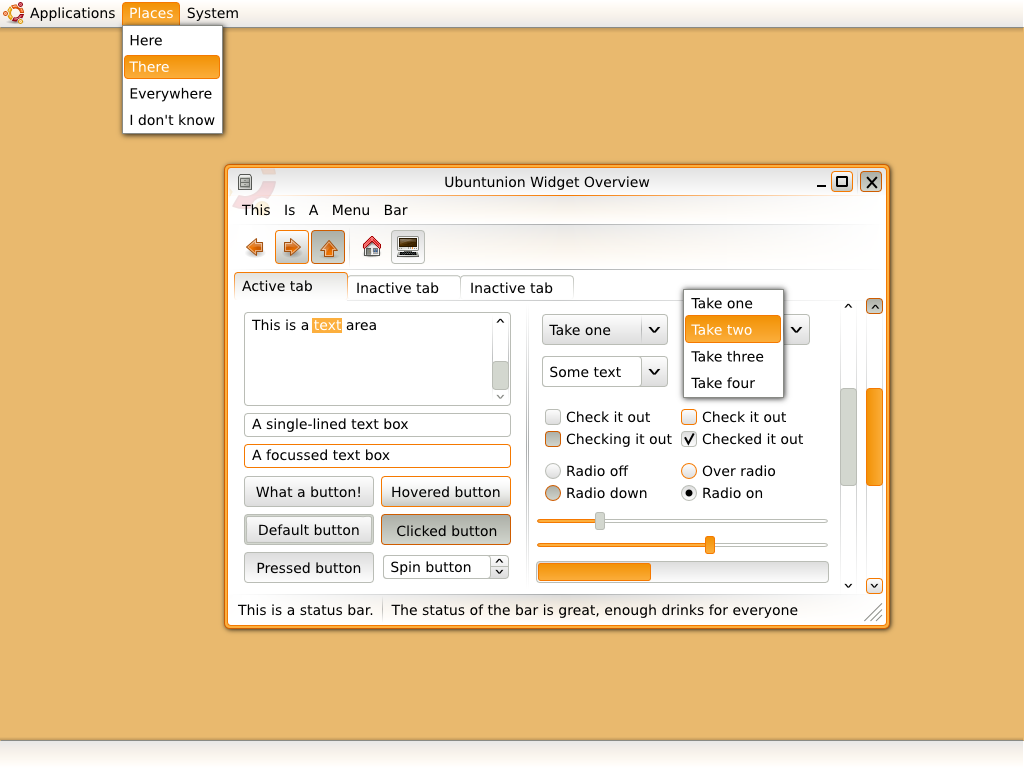
The Incoming Ubuntunion Artwork
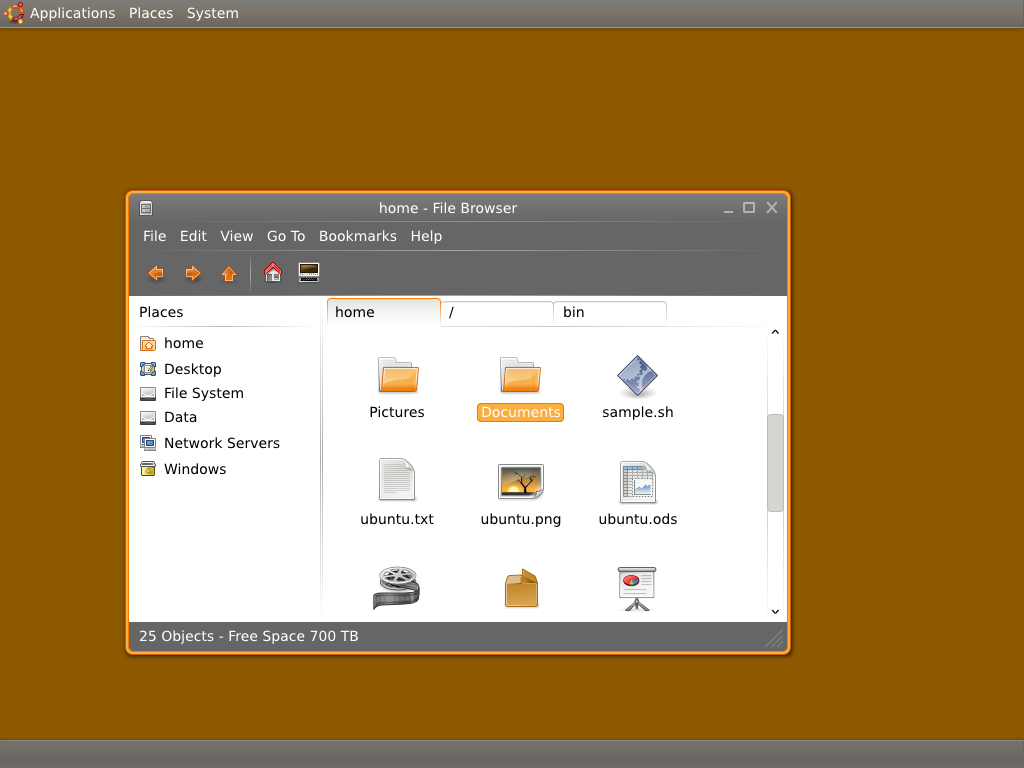
Ubuntunion shall become a GTK and Metacity/Emerald theme. The idea behind it is that every window - including the title bar - shall appear as an union, with no lines seperating it (same idea as behind Sapiens).
Around every window, there is a rounded border that forms a frame for the union that the window shall be. Inside the window, there are ideally no lines or colored areas that seperate the whole window. The different parts of a window (title bars, menus, toolbars...) are seperated by gradient lines, seperating and uniting them at the same time. The colors used come from the Tango Desktop Project color palette, thus Tango/Tangerine would be the preferred icon theme for this concept. Orange is used for highlights like the border of an active window or highlighted text, white for backgrounds, and gray for other parts (like borders of buttons, seperators, borders of inactive windows).
Concept Art

Dark/Half dark edition
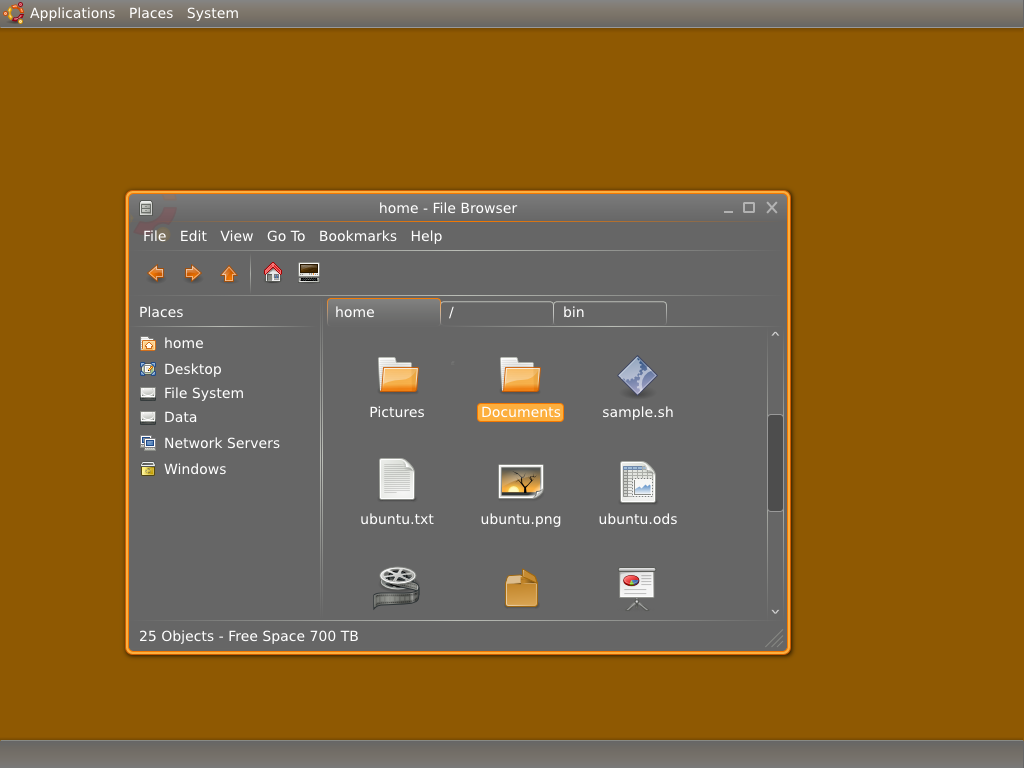
Personally, I think the
Concept Art is really cool.
2008年7月11日星期五
2008年5月24日星期六
2008年4月28日星期一


2008年4月26日星期六
The Free Software Song
by Richard Stallman
Join us now and share the software;
You'll be free, hackers, you'll be free.
x2Hoarders may get piles of money,
That is true, hackers, that is true.
But they cannot help their neighbors;
That's not good, hackers, that's not good.When we have enough free software
At our call, hackers, at our call,
We'll throw out those dirty licenses
Ever more, hackers, ever more.Join us now and share the software;
You'll be free, hackers, you'll be free.
x2
The file free-software-song.au is a recording of Richard Stallman singing this song. It is also in Ogg Vorbis format.
Other interesting versions:
- a heavy metal version by Jono Bacon (2 MB)
- Another song, inspired by this one but mostly different, sung by the band Fenster (4.5M)
- A rhythmic version of free software song in Ogg Vorbis and MP3 formats by Thor.
By the way, Blogspot looks like return. Great!
2008年1月23日星期三
My Winter Vacation's Plan
We finally free!Great!My holiday plan:
- Buy a good Rubik's cube and solve it.
- Try to solve Rubik's cube it without book.
- Play Ra2 Yuri's Revenge and Battle for Wesnoth
- Play Ra2 Yuri's Revenge online with my classmates
- Do some homework
- Install Windows in VirtualBox
- Update AlphaX(http://www.AlphaX.cn/) and OurClass5(http://class.AlphaX.cn/)
- ......
2008年1月22日星期二
万恶的期末考试结束了!
万恶的期末考试终于结束了! 感觉考得不好不差。
快要放寒假了!好事情。
数学:102只能说十分一般。
语文(作文):45
语文(基础):39
语文(总分):84
英语:101
物理:86
化学:74
快要放寒假了!好事情。
2007年12月29日星期六
The New Year's Concert of the Vienna Philharmonic
Forget two years to see "The New Year's Concert of the Vienna Philharmonic". Therefore, we must not miss this really Mody classical concert, otherwise will be a regret.
The New Year's Concert of the Vienna Philharmonic
It has long been a Philharmonic tradition at the New Year to present a program consisting of the lively and at the same time nostalgic music from the vast repertoire of the Johann Strauss family and its contemporaries. These concerts not only delight the audiences in the Musikverein in Vienna, but also enjoy great international popularity through the world wide television broadcasts, which now reach over 50 countries.
Originating during a dark period of Austria's history, these concerts were initially conceived for a local audience as a reminder of better times and a source of hope for the future. Today millions of people throughout the world are similarly encouraged by the light-hearted yet subtly profound character of this music, and draw joy and optimism for the New Year ahead.
It is the desire of the Philharmonic not only to provide musically definitive interpretations of the masterworks of this genre, but at the same time, as musical ambassadors of Austria, to send people all over the world a New Year's greeting in the spirit of hope, friendship and peace.
2007年11月10日星期六
The Final Score of Mid-Term Test
With the score,I am really happy.My score is much better than I had imagined.
Chinese:36.5+29(Composition)
Math:89
Physics:88(81+4+3) , are two that were misunderstood
Chemistry:75
English:103
Total:420.5
My really good luck!
(And W.H.Jack just the opposite)
Chinese:36.5+29(Composition)
Math:89
Physics:88(81+4+3) , are two that were misunderstood
Chemistry:75
English:103
Total:420.5
My really good luck!
(And W.H.Jack just the opposite)
2007年11月8日星期四
万恶的期中考试结束了
随着今天上午化学考试的结束,万恶不赦的期中考试终于结束了。我终于可以喘一口气了。今天基本上除了语文作文,其它分数都出来了。成绩在预料之内,属于正常发挥:
语文(基础):36.5 并不是太理想,将将及格,但愿作文分能高点;
物理:81 似乎还可以;
英语:103 还凑合;
数学:89 一道很简单的送分题竟然错了!!!太了!!!
化学:75 化学我其实没什么把握。
这回考试也有几个被公认为“缺德”的地方:
0)语文考试有一道题限制25字可在答题纸上却给了30个字的地方;
1)物理考试有一道打点计时器的题,用的点不是实际打出的点;
2)英语考试有一道题限制三个单词,很多人没有看见;
3)化学考试中有一道题被公认为最缺德的:“玻璃”容器,太阴了!
但所幸,我都没有中计,呵呵。为中计的同志们默哀……
终于轻松了!!!万岁!!!
语文(基础):36.5 并不是太理想,将将及格,但愿作文分能高点;
物理:81 似乎还可以;
英语:103 还凑合;
数学:89 一道很简单的送分题竟然错了!!!太了!!!
化学:75 化学我其实没什么把握。
这回考试也有几个被公认为“缺德”的地方:
0)语文考试有一道题限制25字可在答题纸上却给了30个字的地方;
1)物理考试有一道打点计时器的题,用的点不是实际打出的点;
2)英语考试有一道题限制三个单词,很多人没有看见;
3)化学考试中有一道题被公认为最缺德的:“玻璃”容器,太阴了!
但所幸,我都没有中计,呵呵。为中计的同志们默哀……
终于轻松了!!!万岁!!!
2007年11月5日星期一
My New Domain -- AlphaX.cn
I have a new domain -- AlphaX.cn(Alpha means I must improve it better,X means I do not know which Alpha my blog is),It is very short and very easy to remember,so cool!I also create a new website,hope you like it.
Go to AlphaX.cn
Go to AlphaX.cn
2007年10月22日星期一
Kimi惊天逆转 巴西站夺冠
对于莱科宁来说,巴西站将是十分艰难的一场比赛。在车手积分上,汉密尔顿107分,阿隆索103分,而他只有100分。在排位赛中,他仅获第三。因此,他获得年度总冠军的希望十分渺茫。
可是,一切皆有可能。
今天的巴西站,马萨切线发车,阻挡住了汉密尔顿,使莱科宁上升到第二。在与阿隆索争夺弯角时,汉密尔顿操之过急,转向不足,冲出了赛道,掉到了第八。这还不是最那什么的。
最富有戏剧性的是,第八圈,汉密尔顿的赛车出现了莫明其妙的故障,速度突然慢了下来,自己的位置也掉到了第十八位。但是一圈过后,他的赛车又重新恢复正常,速度也逐渐拉了起来,但由于损失了这么多时间,汉密尔顿的本站比赛可以说已经没戏了。
第五十圈,马萨进站。之后,莱科宁进站,他比马萨多跑了3圈,加了6.4秒的油,出站之后顺利超越了马萨!按照这样的形势,莱科宁将获得年度车手总冠军!
又不可能变成了可能,Kimi完成了惊天逆转!
又不可能变成了可能,Kimi完成了惊天逆转!
2007年10月19日星期五
Ubuntu 7.10正式发布!
Ubuntu 7.10(开发代号Gutsy Gibbon)正式发布!这实在是太令人激动了!
GNOME 2.20桌面环境
Gutsy Gibbon 搭载着最新的充满诸多新特性的GNOME 2.20 。
3D桌面特效
Compiz Fusion将被默认开启,由此带来改善用户体验和视觉样式的3D桌面特效。当然,一切只在你的硬件有能力运行Compiz时才会打开。否则将会使用普通的窗口管理器──Metacity。在“系统”“首选项”“外观”的“视觉特效”标签中能找到他。
桌面搜索
采用Tracker索引技术的搜索功能被集成进Gutsy Gibbon Beta中,配以面版小程序(Deskbar Applet),用户可以通过这个方便地搜索文件、搜索网络甚至搜索应用程序。
快速用户切换
再也没必要像以前一样慢吞吞地切换当前用户了,只要通过这个面版小程序,切换用户只是瞬间的事情──省去了打用户名和密码的时间。
Ubuntu里的Firefox插件
现在Ubuntu的“添加/删除”应用程序也能安装Firefox插件了!这真的把浏览器跟系统紧密地结合在一起了。
动态屏幕配置和图形化配置工具
在支持多种驱动的情况下(ATi、NVIDIA和Intel等),现在你可以方便地设置屏幕的大小、旋转甚至是多头显示。另外动态屏幕选择将带来视频输出方面的巨大改进。
对于普通用户甚至是图形工作者来说,这是一项非常棒的革新。
全自动安装打印机
安装打印机变得异常方便──仅仅是接上他们并打开他们。打印机的设置也变得十分简单。
更棒的受限驱动管理
受限驱动管理器现在不仅仅可以方便安装受限驱动,现在也可以安装本身是自由的但却需要不自由的固件或其他软件包的驱动。
现在安装Broadcom芯片的无线网卡只需要点击三次鼠标即可。
NTFS 写入支持
NTFS是Microsft Windows使用的文件系统,之前的Ubuntu发行版只支持NTFS的读取。现在Gutsy Gibbon完整地支持了NTFS的读写。
对于常常需要与Windows共享文件的朋友来说真是太方便了!
加强的电源管理
Gutsy Gibbon包括了最新的Linux内核,它加强了对CPU的功耗和热量的控制。对于笔记本用户来说,Gutsy能提供更长的电池使用时间和减少使用时的发热。对于媒体中心的PC机来说,他们将会是一个更安静且减少产热的环境。
下载:
http://www.ubuntu.com/getubuntu/download
http://www.ubuntu.com/getubuntu/downloadmirrors 其他镜像
http://releases.ubuntu.com/7.10/ 官方
http://cdimage.ubuntu.com/dvd/current/ DVD版本
http://ftp.hostrino.com/pub/ubuntu/cdimage/ 香港
http://ftp.cse.yzu.edu.tw/pub/Linux/Ubuntu/ubuntu-cd/ 台湾
http://ftp.tcc.edu.tw/iso/Ubuntu/ 台湾
http://ftp.twaren.net/Linux/Ubuntu/ubuntu-cd/ 台湾
http://tw.releases.ubuntu.com/ 台湾
http://ftp.ncnu.edu.tw/Linux/ubuntu/ubuntu-cd/ 台湾
http://ubuntu.csie.nctu.edu.tw/ubuntu-releases/ 台湾
CD md5:
ebf7ad055bc39634065daa10de980d7e *ubuntu-7.10-alternate-amd64.iso
9a4ae3cfd68911a861d094ec834c9b48 *ubuntu-7.10-alternate-i386.iso
61c87943a92bc7bf519da4e2555d6e86 *ubuntu-7.10-desktop-amd64.iso
d2334dbba7313e9abc8c7c072d2af09c *ubuntu-7.10-desktop-i386.iso
43ff753b260729b12c7d21d3a6db8c73 *ubuntu-7.10-server-amd64.iso
7d88cd87df509a740d9f47b9bbf1375e *ubuntu-7.10-server-i386.iso
5308a79f5e652edba5be84644ee14b09 *ubuntu-7.10-server-sparc.iso
DVD md5:
22c988d3a074acd2a65fa461129aeda5 *gutsy-dvd-amd64.iso
b5d9aaa45af862b4c804530734216a15 *gutsy-dvd-i386.iso
升级:
feisty:
用任何文本编辑器以root权限修改 /etc/apt/sources.list,将里面所有的feisty都替换成gutsy,保存,运行
sudo apt-get update
sudo apt-get dist-upgrade
然后请耐心等待。
注意,不要从更低版本的ubuntu升级到gutsy,必须逐步升级,即6.06->6.10->7.04->7.10,否则无法保证升级顺利。
祝大家安装顺利!
(参考Ubuntu中文论坛:http://forum.ubuntu.org.cn/viewtopic.php?t=81418)
GNOME 2.20桌面环境
Gutsy Gibbon 搭载着最新的充满诸多新特性的GNOME 2.20 。
3D桌面特效
Compiz Fusion将被默认开启,由此带来改善用户体验和视觉样式的3D桌面特效。当然,一切只在你的硬件有能力运行Compiz时才会打开。否则将会使用普通的窗口管理器──Metacity。在“系统”“首选项”“外观”的“视觉特效”标签中能找到他。
桌面搜索
采用Tracker索引技术的搜索功能被集成进Gutsy Gibbon Beta中,配以面版小程序(Deskbar Applet),用户可以通过这个方便地搜索文件、搜索网络甚至搜索应用程序。
快速用户切换
再也没必要像以前一样慢吞吞地切换当前用户了,只要通过这个面版小程序,切换用户只是瞬间的事情──省去了打用户名和密码的时间。
Ubuntu里的Firefox插件
现在Ubuntu的“添加/删除”应用程序也能安装Firefox插件了!这真的把浏览器跟系统紧密地结合在一起了。
动态屏幕配置和图形化配置工具
在支持多种驱动的情况下(ATi、NVIDIA和Intel等),现在你可以方便地设置屏幕的大小、旋转甚至是多头显示。另外动态屏幕选择将带来视频输出方面的巨大改进。
对于普通用户甚至是图形工作者来说,这是一项非常棒的革新。
全自动安装打印机
安装打印机变得异常方便──仅仅是接上他们并打开他们。打印机的设置也变得十分简单。
更棒的受限驱动管理
受限驱动管理器现在不仅仅可以方便安装受限驱动,现在也可以安装本身是自由的但却需要不自由的固件或其他软件包的驱动。
现在安装Broadcom芯片的无线网卡只需要点击三次鼠标即可。
NTFS 写入支持
NTFS是Microsft Windows使用的文件系统,之前的Ubuntu发行版只支持NTFS的读取。现在Gutsy Gibbon完整地支持了NTFS的读写。
对于常常需要与Windows共享文件的朋友来说真是太方便了!
加强的电源管理
Gutsy Gibbon包括了最新的Linux内核,它加强了对CPU的功耗和热量的控制。对于笔记本用户来说,Gutsy能提供更长的电池使用时间和减少使用时的发热。对于媒体中心的PC机来说,他们将会是一个更安静且减少产热的环境。
下载:
http://www.ubuntu.com/getubuntu/download
http://www.ubuntu.com/getubuntu/downloadmirrors 其他镜像
http://releases.ubuntu.com/7.10/ 官方
http://cdimage.ubuntu.com/dvd/current/ DVD版本
http://ftp.hostrino.com/pub/ubuntu/cdimage/ 香港
http://ftp.cse.yzu.edu.tw/pub/Linux/Ubuntu/ubuntu-cd/ 台湾
http://ftp.tcc.edu.tw/iso/Ubuntu/ 台湾
http://ftp.twaren.net/Linux/Ubuntu/ubuntu-cd/ 台湾
http://tw.releases.ubuntu.com/ 台湾
http://ftp.ncnu.edu.tw/Linux/ubuntu/ubuntu-cd/ 台湾
http://ubuntu.csie.nctu.edu.tw/ubuntu-releases/ 台湾
CD md5:
ebf7ad055bc39634065daa10de980d7e *ubuntu-7.10-alternate-amd64.iso
9a4ae3cfd68911a861d094ec834c9b48 *ubuntu-7.10-alternate-i386.iso
61c87943a92bc7bf519da4e2555d6e86 *ubuntu-7.10-desktop-amd64.iso
d2334dbba7313e9abc8c7c072d2af09c *ubuntu-7.10-desktop-i386.iso
43ff753b260729b12c7d21d3a6db8c73 *ubuntu-7.10-server-amd64.iso
7d88cd87df509a740d9f47b9bbf1375e *ubuntu-7.10-server-i386.iso
5308a79f5e652edba5be84644ee14b09 *ubuntu-7.10-server-sparc.iso
DVD md5:
22c988d3a074acd2a65fa461129aeda5 *gutsy-dvd-amd64.iso
b5d9aaa45af862b4c804530734216a15 *gutsy-dvd-i386.iso
升级:
feisty:
用任何文本编辑器以root权限修改 /etc/apt/sources.list,将里面所有的feisty都替换成gutsy,保存,运行
sudo apt-get update
sudo apt-get dist-upgrade
然后请耐心等待。
注意,不要从更低版本的ubuntu升级到gutsy,必须逐步升级,即6.06->6.10->7.04->7.10,否则无法保证升级顺利。
祝大家安装顺利!
(参考Ubuntu中文论坛:http://forum.ubuntu.org.cn/viewtopic.php?t=81418)
Blogspot is return
Bloggerspaces crashed 2weeks ago,but
Great!With out proxy,we can visit blogspot now!!!
Great!
Great!With out proxy,we can visit blogspot now!!!
Great!
订阅:
博文 (Atom)


 博文
博文


